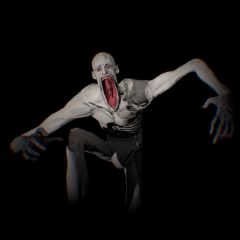
SCP-096 stands as one of the most iconic and terrifying anomalous entities within the SCP Foundation universe. When stepping into online SCP 096 web games, understanding its background, mastering its trigger mechanics, and fully memorizing the control scheme is the only line between survival and instant death.
SCP-096 Lore: The Origin of 'The Shy Guy'
According to the official lore of the SCP Foundation, SCP-096 is a humanoid creature standing approximately 2.38 meters tall, featuring skin entirely devoid of pigmentation, abnormally long arms (reaching 1.5 meters), and a complete lack of body hair.
In the context of survival horror games, you assume the role of a Class-D personnel trapped inside an underground research facility following a containment breach. You must navigate through dark corridors where SCP-096 roams freely.
SCP-096 In-Game Mechanics: Do Not Look At Its Face!
To survive an encounter in an SCP 096 web game, you must memorize its unique Trigger Mechanism:
- Docile State: SCP-096 sits on the floor, crying and sobbing heavily. In this state, it is entirely harmless. You can walk past it or even bump into it without triggering a reaction.
- The Trigger: The moment your camera crosshair looks at SCP-096's face (even for a fraction of a second, or through glass and security cameras), its rage cycle activates instantly.
- Enraged State: Immediately after its face is viewed, SCP-096 covers its face and screams violently for 1-2 seconds, providing your only window to run. It then pursues you with extreme velocity. In this state, SCP-096 smashes through doors, clips through obstacles, and cannot be harmed by standard weapons.
This survival rule of looking down at the floor to stay alive applies perfectly when facing the entity Eyes in Roblox Doors - the famous horror hotel game that features this exact gaze-avoidance mechanic.
SCP-096 Game Controls System
Since these games run directly on web browsers (via HTML5/WebGL), the control scheme is optimized to ensure quick muscle reflexes during emergencies.
- Pro-Tip: As soon as the game loads, left-click on the game screen to enable Pointer Lock. This locks your mouse cursor to the game window, allowing smooth 360-degree camera movement without sliding off the browser edges.
- W, A, S, D: Use these keys to navigate forward, left, backward, and right. Use them fluidly to check blind corners carefully.
- Mouse: Move your mouse to rotate the camera. Keep your mouse aimed at the floor whenever you hear sobbing to avoid its face.
- Shift: Hold this key to Sprint. Use this only when SCP-096 is enraged, as stamina drains quickly on web platforms.
- Ctrl or C: Crouch to walk quietly. This reduces footstep noise when navigating near sound-sensitive anomalies.
- E or F: Interact with the environment to open doors or pick up Keycards. Use these to quick-open elevators or blast doors to slow down the entity's pursuit.
- Spacebar: Press this to Jump or Blink. This is often necessary when coordinating escape routes shared with other entities like SCP-173.
- Tab: Opens your Inventory to check collected utility items or facility layout maps.
- Esc: Pauses the game, pulls up the menu, and unlocks your mouse cursor from the browser window.
Crucial Tips to Survive SCP-096
- Use Headphones for Audio Cue Positioning: SCP-096's crying can be heard from a long distance through stereo web audio. Locate the direction of the sobbing and navigate toward alternative routes.
- Exploit the Screaming Delay: When you look at its face, the entity freezes in place to scream before beginning the hunt. Use these precious golden seconds to run to the nearest elevator. Closing elevator doors is the most reliable way to break its aggro line.
- Run Zig-Zag through Pressure Doors: SCP-096 moves in a straight line at high speeds. Sprint through heavy security gates and hit the button to close them right behind you to systematically decay its pursuit momentum.
FAQs
Can I actually kill SCP-096?
No. SCP-096 is designed to be indestructible. Once it enters its 'Enraged' state, your only goal is to outrun or hide from it until it returns to its docile state. Fighting it with weapons is ineffective.
Why does the game screen shake and make noise?
This is a warning sign. The screen shaking and loud screaming indicate that you have accidentally looked at SCP-096's face. When this happens, the entity has locked onto your location, and it will pursue you relentlessly until you are eliminated or until you successfully hide behind a security door or in an elevator.
How do I stop the camera from sliding off the game window?
This is a common issue with browser games. As soon as the game loads, click the Left Mouse Button anywhere inside the game area. This activates 'Pointer Lock,' which keeps your cursor trapped within the game window, allowing for smooth 360-degree camera movement without hitting the browser edges.